⚡ Limited time: Get Agency OS for $99 instead of $175 and save $76
Notion Cover Size Guide: Dimensions, Banners & Headers Explained
Notion Cover Size Guide: Dimensions, Banners & Headers Explained
Confused about the right Notion cover size? This complete guide explains the best dimensions for Notion covers, banners, headers, and how to make your workspace look perfect on all devices.

Your Notion cover is more than just decoration — it sets the tone for your entire workspace. But if you’ve ever added a cover image that looks blurry, awkwardly cropped, or off-center on mobile, you’re not alone.
The problem? Notion doesn’t clearly tell you what the ideal cover size is.
This guide breaks it all down:
The best Notion cover dimensions
How covers appear on desktop, tablet, and mobile
Sizing tips for banners, headers, and full-width images
Plus, tools to create or find perfectly-sized images
Whether you want a minimal look, aesthetic collage, or personal header, let’s make sure it looks clean on every device.
Your Notion cover is more than just decoration — it sets the tone for your entire workspace. But if you’ve ever added a cover image that looks blurry, awkwardly cropped, or off-center on mobile, you’re not alone.
The problem? Notion doesn’t clearly tell you what the ideal cover size is.
This guide breaks it all down:
The best Notion cover dimensions
How covers appear on desktop, tablet, and mobile
Sizing tips for banners, headers, and full-width images
Plus, tools to create or find perfectly-sized images
Whether you want a minimal look, aesthetic collage, or personal header, let’s make sure it looks clean on every device.
Recommended Notion Cover Sizes – Device by Device
Device | Visible Area | Recommended Upload Size | Notes |
|---|---|---|---|
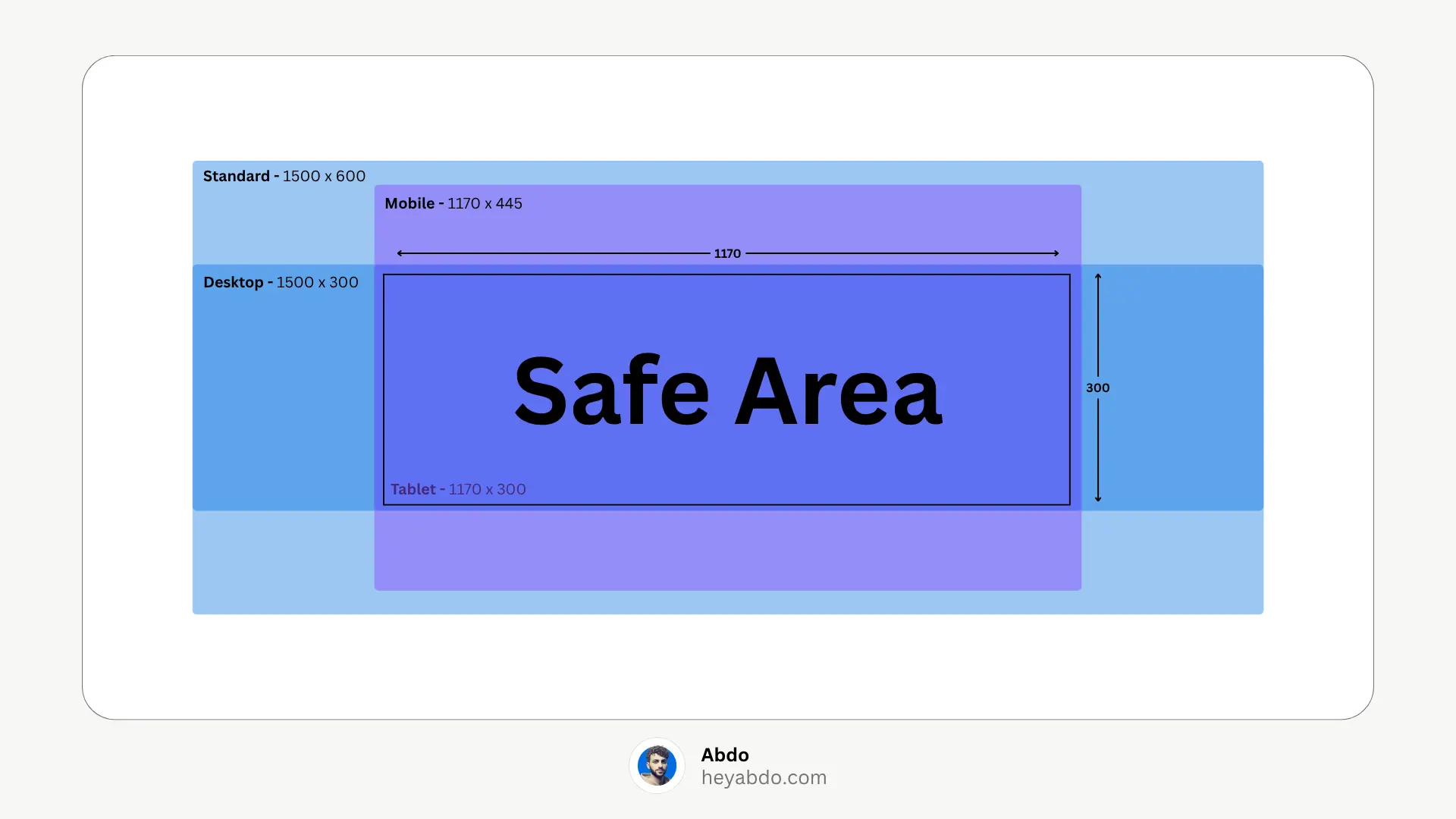
Desktop (with sidebar) | ~1500 × 290 px | 1500 × 600 px | Default Notion size, full display |
Desktop (full-width) | ~1500 × 230 px | 1500 × 600 px | For wider pages, more creative bleed |
Tablet | ~1170 × 290 px | 1500 × 600 px | Cropped top/bottom |
Mobile (portrait) | ~1170 × 445 px | 1500 × 600 px | Sharp width, deeper crop vertically |
Gallery View Covers | Square or 4:3 | Varies (e.g., 1200 × 900 px) | Use gallery settings (“Fit image”) to avoid cropping |
Pro Tip: Center Safe-Zone
Since Notion crops images (especially mobile), ensure all key content—bets text, faces, logos—stays within the center 1000 × 400 px area. This avoids accidental trimming on narrower screens.
Cover Types Explained (Notion Terms vs User Terms)
Although Notion labels it as a “cover,” tooling and user behavior differentiate:
Notion Cover: The default, full-width page banner
Notion Banner: Often used to describe wider graphics (e.g., 1600px+)
Notion Header: A shorter, minimalist version (e.g., 1200 × 300 px), ideal for subtle branding
Notion doesn't officially distinguish it's all in the uploader. Still, designing for specific layouts ensures visual harmony.
Creating & Uploading Crisp Covers
Recommended Workflow:
Choose your base size (1500 × 600 px standard)
Design using Canva, Figma, or Mega Creator (ensure central composition)
Export as JPG for photos or PNG for sharp text/graphics
For HiDPI, double-up (3000 × 1200 px), then compress for web use
Cover Insertion in Notion:
Click “Add Cover” above the page title
Hover → click Change cover → Upload / Link / Unsplash
Click Reposition → Drag and Save position
Sidebar, Gallery, and Database Views
Sidebar-thumbnails: Notion shows smaller cover strips (height ~30 px); avoid dense visuals.
Gallery Views: Use square or 4:3 images, then toggle “Fit image” to avoid odd crops.
Database header images: Aesthetic pattern overlays with consistent elements ensure clean visuals from different angles.
Common Pitfalls & Fixes
Blurry covers: Typically due to images under 1500 px wide.
Off-center graphics/text: Caused by misplacement; reposition ASAP.
Large file sizes: Aim for <150 KB; over 5 MB may hurt load times.
Unsupported formats: Avoid GIFs; use static PNG/JPG/WEBP formats.
Need More
Before designing, it’s good to see what covers look best — check out our Best 20 Aesthetic Notion Covers + Generator Sites
Want to create your own covers in Canva? Follow our How to Create Custom Notion Covers Using Canva tutorial for simple design tips.
To get the full context on choosing covers, don’t miss our Ultimate Guide to Notion Covers.
Recommended Notion Cover Sizes – Device by Device
Device | Visible Area | Recommended Upload Size | Notes |
|---|---|---|---|
Desktop (with sidebar) | ~1500 × 290 px | 1500 × 600 px | Default Notion size, full display |
Desktop (full-width) | ~1500 × 230 px | 1500 × 600 px | For wider pages, more creative bleed |
Tablet | ~1170 × 290 px | 1500 × 600 px | Cropped top/bottom |
Mobile (portrait) | ~1170 × 445 px | 1500 × 600 px | Sharp width, deeper crop vertically |
Gallery View Covers | Square or 4:3 | Varies (e.g., 1200 × 900 px) | Use gallery settings (“Fit image”) to avoid cropping |
Pro Tip: Center Safe-Zone
Since Notion crops images (especially mobile), ensure all key content—bets text, faces, logos—stays within the center 1000 × 400 px area. This avoids accidental trimming on narrower screens.
Cover Types Explained (Notion Terms vs User Terms)
Although Notion labels it as a “cover,” tooling and user behavior differentiate:
Notion Cover: The default, full-width page banner
Notion Banner: Often used to describe wider graphics (e.g., 1600px+)
Notion Header: A shorter, minimalist version (e.g., 1200 × 300 px), ideal for subtle branding
Notion doesn't officially distinguish it's all in the uploader. Still, designing for specific layouts ensures visual harmony.
Creating & Uploading Crisp Covers
Recommended Workflow:
Choose your base size (1500 × 600 px standard)
Design using Canva, Figma, or Mega Creator (ensure central composition)
Export as JPG for photos or PNG for sharp text/graphics
For HiDPI, double-up (3000 × 1200 px), then compress for web use
Cover Insertion in Notion:
Click “Add Cover” above the page title
Hover → click Change cover → Upload / Link / Unsplash
Click Reposition → Drag and Save position
Sidebar, Gallery, and Database Views
Sidebar-thumbnails: Notion shows smaller cover strips (height ~30 px); avoid dense visuals.
Gallery Views: Use square or 4:3 images, then toggle “Fit image” to avoid odd crops.
Database header images: Aesthetic pattern overlays with consistent elements ensure clean visuals from different angles.
Common Pitfalls & Fixes
Blurry covers: Typically due to images under 1500 px wide.
Off-center graphics/text: Caused by misplacement; reposition ASAP.
Large file sizes: Aim for <150 KB; over 5 MB may hurt load times.
Unsupported formats: Avoid GIFs; use static PNG/JPG/WEBP formats.
Need More
Before designing, it’s good to see what covers look best — check out our Best 20 Aesthetic Notion Covers + Generator Sites
Want to create your own covers in Canva? Follow our How to Create Custom Notion Covers Using Canva tutorial for simple design tips.
To get the full context on choosing covers, don’t miss our Ultimate Guide to Notion Covers.

About
Maximize your Notion
workflow
Maximize your Notion
workflow
help people get more out of Notion without the complexity. With over 50,000 downloads, my minimalist templates support Startups, students, creators, and entrepreneurs in organizing their life and work with ease.
FAQ
What is the best Notion cover image size?
What size should a Notion banner be?
Does Notion crop cover images on mobile?
Can I upload a custom cover in Notion?
Why does my Notion cover look blurry?
Need a custom Notion system?
I build complete operating systems tailored to your business. Book a free 15-min call.
Book a Free Call →
Love it? Share it!


Need Something Custom?
Need a Custom Workspace?
We design and build complete Notion systems tailored specifically to your business — your clients, your services, your workflows. No generic templates.
We design and build complete Notion systems tailored specifically to your business — your clients, your services, your workflows. No generic templates.
Free 15-min strategy call included

Helping you manage your life and business in one place with Notion.
© 2026 Abdo. All rights reserved.
Helping you manage your life and business in one place with Notion.
© 2026 Abdo. All rights reserved.
Helping you manage your life and business in one place with Notion.
© 2026 Abdo. All rights reserved.