⚡ Limited time: Get Agency OS for $99 instead of $175 and save $76
Notion
Wiki
Agency
SOPs
How to Make a Notion Wiki Template Actually Work for Your Agency
How to Make a Notion Wiki Template Actually Work for Your Agency
Most Notion Wikis fail not because of how they are built, but because there is no system around them. Here is the 5-part framework that makes yours actually work.

You set it up. You built the pages. You added the SOPs.
Then nobody used it. Six months later, half the pages are outdated, three are half-finished, and your team still asks you the same questions they could find in the wiki if they looked.
This is not a Notion problem. It is a system problem.
A Notion Wiki template gives you structure. But structure alone does not create usage. You need five things working together: the right categories, written standards, a publishing workflow, daily usage habits, and a maintenance schedule that keeps it alive.
This post walks through all five with real agency examples you can apply today.
You set it up. You built the pages. You added the SOPs.
Then nobody used it. Six months later, half the pages are outdated, three are half-finished, and your team still asks you the same questions they could find in the wiki if they looked.
This is not a Notion problem. It is a system problem.
A Notion Wiki template gives you structure. But structure alone does not create usage. You need five things working together: the right categories, written standards, a publishing workflow, daily usage habits, and a maintenance schedule that keeps it alive.
This post walks through all five with real agency examples you can apply today.
Part 1: Build the Right Categories First
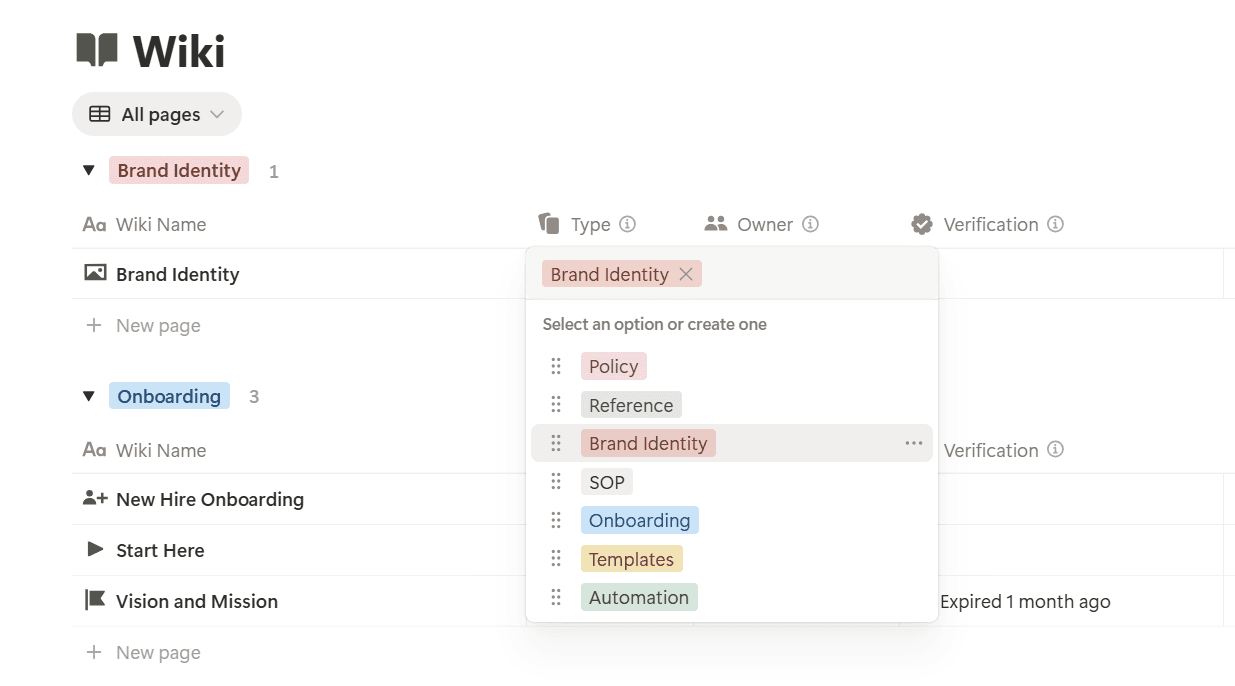
A good wiki has a clear hierarchy that makes it obvious where to look and where to add.
Recommended top-level categories for an agency wiki:
Operations for how your agency runs day to day
Client Delivery for how you do the work
Sales and Proposals for how you close and scope
Team and HR for hiring, onboarding, expectations
Resources for tools, templates, and reference material
Inside each category, keep pages at two levels maximum. A page and its sub-pages. If you need a third level, that is a signal the category is too broad.
Agency example: Your Client Delivery section should have a top-level page called Our Delivery Process with sub-pages for each phase: Discovery, Build, Review, Handoff. Each sub-page has one job: explain how that phase works and link to the relevant SOPs.
One rule: Every page lives in exactly one category. If a page fits in two places, create a shortcut link and do not duplicate the content.
Part 2: Make Consistency Automatic
The fastest way to kill a wiki is to let everyone write pages differently. Some pages have long paragraphs. Some have bullet lists. Some have nothing but a heading and a date. Standards fix this.
Create three base templates inside your Notion Wiki:
SOP Template: title, one-sentence purpose, numbered steps, owner, last reviewed date
Reference Template: title, what it is, when to use it, links
Checklist Template: title, context, checklist items, completion note
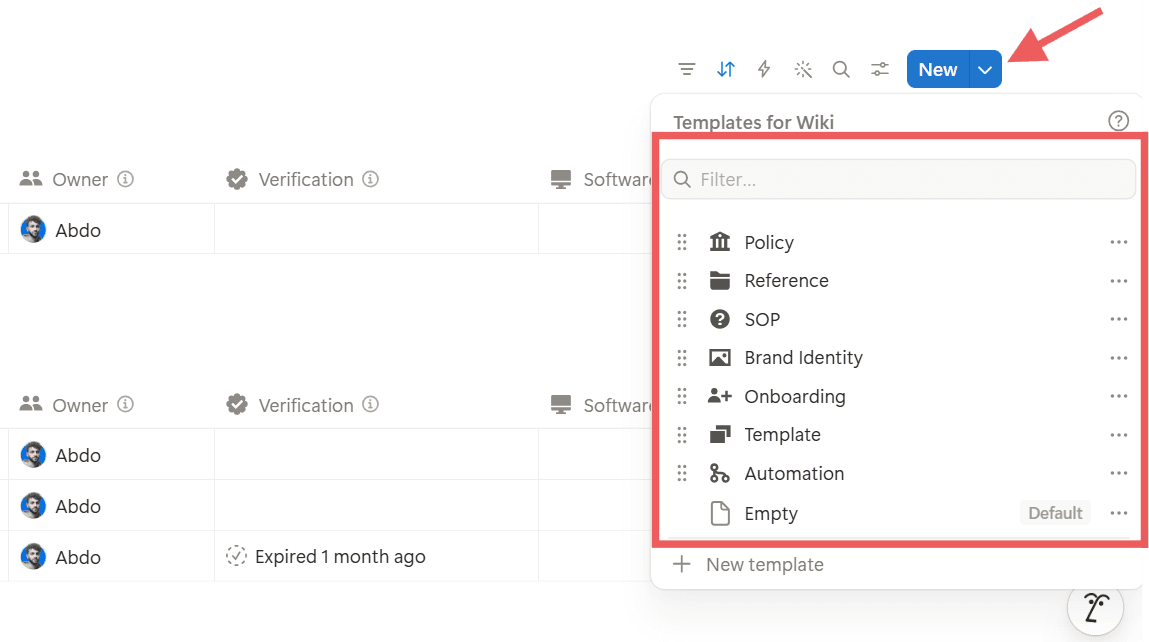
Required properties on every wiki page:
Owner, the person responsible for keeping it current
Status: Draft, Active, or Archived
Last Reviewed date
Category, linked to the top-level section
Agency example: Your client onboarding checklist should not live as a free-form page. It should use the Checklist Template, have an Owner assigned, and carry a Last Reviewed date. When a new client comes in, your team opens that page and works through it. No improvisation.
Part 1: Build the Right Categories First
A good wiki has a clear hierarchy that makes it obvious where to look and where to add.
Recommended top-level categories for an agency wiki:
Operations for how your agency runs day to day
Client Delivery for how you do the work
Sales and Proposals for how you close and scope
Team and HR for hiring, onboarding, expectations
Resources for tools, templates, and reference material
Inside each category, keep pages at two levels maximum. A page and its sub-pages. If you need a third level, that is a signal the category is too broad.
Agency example: Your Client Delivery section should have a top-level page called Our Delivery Process with sub-pages for each phase: Discovery, Build, Review, Handoff. Each sub-page has one job: explain how that phase works and link to the relevant SOPs.
One rule: Every page lives in exactly one category. If a page fits in two places, create a shortcut link and do not duplicate the content.
Part 2: Make Consistency Automatic
The fastest way to kill a wiki is to let everyone write pages differently. Some pages have long paragraphs. Some have bullet lists. Some have nothing but a heading and a date. Standards fix this.
Create three base templates inside your Notion Wiki:
SOP Template: title, one-sentence purpose, numbered steps, owner, last reviewed date
Reference Template: title, what it is, when to use it, links
Checklist Template: title, context, checklist items, completion note
Required properties on every wiki page:
Owner, the person responsible for keeping it current
Status: Draft, Active, or Archived
Last Reviewed date
Category, linked to the top-level section
Agency example: Your client onboarding checklist should not live as a free-form page. It should use the Checklist Template, have an Owner assigned, and carry a Last Reviewed date. When a new client comes in, your team opens that page and works through it. No improvisation.
⚠ The most common mistake agencies make
Most agency wikis are built without any page templates. The result: every page looks different, every writer structures content their own way, and the team stops trusting the wiki because they never know what to expect when they open a page. Templates are not optional. They are the foundation of a trustworthy wiki.
⚠ The most common mistake agencies make
Most agency wikis are built without any page templates. The result: every page looks different, every writer structures content their own way, and the team stops trusting the wiki because they never know what to expect when they open a page. Templates are not optional. They are the foundation of a trustworthy wiki.
Part 3: From Draft to Approved
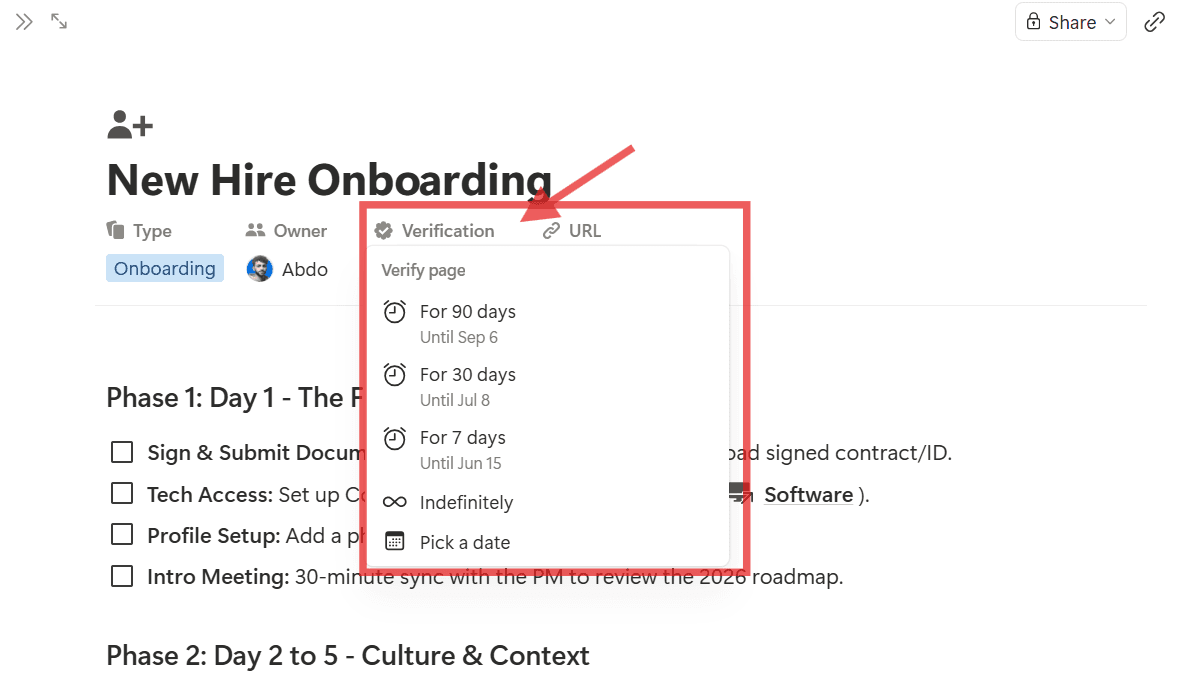
New pages added without a review process create noise. A page that has not been approved is not an asset. It is a liability.
Build a simple three-stage workflow:
Draft: the page exists but is a work in progress. Not linked in navigation. Not used by the team.
Review: the page is written and waiting for the owner or a second person to verify it.
Approved: the page is live, linked in navigation, and ready for the team to use.
Add a Status property to every wiki page and filter your main wiki views to show only Approved pages by default. Drafts and reviews stay visible to whoever is building them, not to the whole team.
Review cycles: set a recurring reminder monthly or quarterly to go through Approved pages. If the information has changed, the owner updates it and resets the Last Reviewed date. If the page no longer applies, it moves to Archived, not deleted.
Agency example: Your Proposal and Scope Guidelines page should go through this cycle every quarter. Pricing changes. Scope boundaries shift. A page that was accurate six months ago might be sending the wrong message today.
Part 4: Make It Part of Daily Work
The biggest mistake is building the wiki then expecting the team to remember it exists. Usage has to be built into the workflow.
Three ways to embed the wiki into daily operations:
Link from inside your project system. Every new client project in Notion should have a link to the relevant SOPs in the wiki. Your team lands on the project, sees Delivery SOP, clicks it. They do not need to go searching.
Reference it in team standups. When a question comes up that should be in the wiki, do not just answer it. Pull up the page and answer from there. Reinforce the habit that the answer lives in the wiki.
Use it during onboarding. When a new hire or contractor joins, the first week is wiki week. They read the relevant sections, ask questions, and help improve unclear pages.
Agency example: Your QA Checklist before client handoff should not live in someone's head or a shared Google Doc. It should be in the wiki, linked directly from your handoff task in the project system. When your team hits that task, they open the checklist. Every time. No variation.
Part 3: From Draft to Approved
New pages added without a review process create noise. A page that has not been approved is not an asset. It is a liability.
Build a simple three-stage workflow:
Draft: the page exists but is a work in progress. Not linked in navigation. Not used by the team.
Review: the page is written and waiting for the owner or a second person to verify it.
Approved: the page is live, linked in navigation, and ready for the team to use.
Add a Status property to every wiki page and filter your main wiki views to show only Approved pages by default. Drafts and reviews stay visible to whoever is building them, not to the whole team.
Review cycles: set a recurring reminder monthly or quarterly to go through Approved pages. If the information has changed, the owner updates it and resets the Last Reviewed date. If the page no longer applies, it moves to Archived, not deleted.
Agency example: Your Proposal and Scope Guidelines page should go through this cycle every quarter. Pricing changes. Scope boundaries shift. A page that was accurate six months ago might be sending the wrong message today.
Part 4: Make It Part of Daily Work
The biggest mistake is building the wiki then expecting the team to remember it exists. Usage has to be built into the workflow.
Three ways to embed the wiki into daily operations:
Link from inside your project system. Every new client project in Notion should have a link to the relevant SOPs in the wiki. Your team lands on the project, sees Delivery SOP, clicks it. They do not need to go searching.
Reference it in team standups. When a question comes up that should be in the wiki, do not just answer it. Pull up the page and answer from there. Reinforce the habit that the answer lives in the wiki.
Use it during onboarding. When a new hire or contractor joins, the first week is wiki week. They read the relevant sections, ask questions, and help improve unclear pages.
Agency example: Your QA Checklist before client handoff should not live in someone's head or a shared Google Doc. It should be in the wiki, linked directly from your handoff task in the project system. When your team hits that task, they open the checklist. Every time. No variation.
💡 The habit that changes everything
The single highest-impact change you can make is to link your Delivery SOP directly from your project template. Every new project gets created, the SOP link is already there, and your team clicks it as part of the normal flow. You do not need to remind anyone. The system does it for you.
💡 The habit that changes everything
The single highest-impact change you can make is to link your Delivery SOP directly from your project template. Every new project gets created, the SOP link is already there, and your team clicks it as part of the normal flow. You do not need to remind anyone. The system does it for you.
Part 5: The Kill or Update Rule
A wiki that is not maintained becomes noise. Noise makes people stop trusting the wiki. When the wiki is not trusted, nobody uses it.
The quarterly maintenance process: set one hour per quarter on your calendar. Go through every Approved page and ask two questions: is this still accurate? Is this still relevant?
If yes to both, update the Last Reviewed date and move on. If the answer to either is no, update the page or archive it.
The Kill or Update rule: any page that has not been reviewed in 6 months automatically drops to Draft status until someone reviews it. This keeps the Active wiki clean and trustworthy.
Agency example: Your Client FAQs and Response Library should be reviewed every quarter. New questions come in. Old questions stop being asked. If you are still listing answers to questions nobody asks anymore, clean it out.
The 5 Pages Every Agency Needs First
Client Onboarding Checklist: step-by-step process from signed contract to project kickoff
Delivery SOP: how your agency builds, structured by phase
Proposal and Scope Guidelines: what to include, what to exclude, pricing structure
QA Checklist Before Handoff: every review step before work leaves your hands
Client FAQs and Response Library: your best answers to recurring client questions, ready to copy and send
Build these five first. Everything else is secondary.
Start Today: 30-Minute Checklist
Create a new Notion page called Agency Wiki
Add five top-level sub-pages: Operations, Client Delivery, Sales, Team, Resources
Create three page templates: SOP, Reference, Checklist
Add four properties to every page: Owner, Status, Last Reviewed, Category
Write your first page using the SOP template, starting with your Delivery SOP
Set it to Draft and send it to one team member for review
Set a calendar reminder for a quarterly wiki review
7-Day Implementation Plan
Day 1: build your five top-level categories. No content yet.
Day 2: create your three page templates with all required properties.
Day 3: write your five essential agency pages. Set them all to Draft.
Day 4: send the five pages to a team member. Get feedback. Make edits.
Day 5: move reviewed pages to Approved and link them from inside your project system.
Day 6: walk your team through the wiki in 15 minutes. Show them where things live.
Day 7: add a recurring quarterly calendar event called Wiki Review.
Common Mistakes and How to Fix Them
Building before defining categories. You add pages with no clear home. Fix it by defining your five categories before writing a single page.
No page templates. Every page looks different and nobody knows what it should contain. Fix it by creating three standard templates and using them for everything.
No owner assigned. Pages are orphans and nobody knows who is responsible. Fix it by assigning exactly one Owner to every page.
Building it alone. You build it, announce it to the team, and wonder why nobody opens it. Fix it by involving one other person during the build.
Treating it as an archive. You add pages and forget them. Fix it by implementing the Kill or Update rule with a review date on every page.
Too many levels of nesting. Finding anything requires four clicks. Fix it by keeping a maximum of two levels.
A Notion Wiki is not something you set up once and leave. It is something you build, use, maintain, and improve.
If you want this pre-built inside a complete agency operating system, the Startup OS has the full wiki structure, all templates, and the properties you need ready to go. Or book a free call if you want a custom workspace built for your specific agency: cal.com/custom-notion-system-nixi/abdo
Part 5: The Kill or Update Rule
A wiki that is not maintained becomes noise. Noise makes people stop trusting the wiki. When the wiki is not trusted, nobody uses it.
The quarterly maintenance process: set one hour per quarter on your calendar. Go through every Approved page and ask two questions: is this still accurate? Is this still relevant?
If yes to both, update the Last Reviewed date and move on. If the answer to either is no, update the page or archive it.
The Kill or Update rule: any page that has not been reviewed in 6 months automatically drops to Draft status until someone reviews it. This keeps the Active wiki clean and trustworthy.
Agency example: Your Client FAQs and Response Library should be reviewed every quarter. New questions come in. Old questions stop being asked. If you are still listing answers to questions nobody asks anymore, clean it out.
The 5 Pages Every Agency Needs First
Client Onboarding Checklist: step-by-step process from signed contract to project kickoff
Delivery SOP: how your agency builds, structured by phase
Proposal and Scope Guidelines: what to include, what to exclude, pricing structure
QA Checklist Before Handoff: every review step before work leaves your hands
Client FAQs and Response Library: your best answers to recurring client questions, ready to copy and send
Build these five first. Everything else is secondary.
Start Today: 30-Minute Checklist
Create a new Notion page called Agency Wiki
Add five top-level sub-pages: Operations, Client Delivery, Sales, Team, Resources
Create three page templates: SOP, Reference, Checklist
Add four properties to every page: Owner, Status, Last Reviewed, Category
Write your first page using the SOP template, starting with your Delivery SOP
Set it to Draft and send it to one team member for review
Set a calendar reminder for a quarterly wiki review
7-Day Implementation Plan
Day 1: build your five top-level categories. No content yet.
Day 2: create your three page templates with all required properties.
Day 3: write your five essential agency pages. Set them all to Draft.
Day 4: send the five pages to a team member. Get feedback. Make edits.
Day 5: move reviewed pages to Approved and link them from inside your project system.
Day 6: walk your team through the wiki in 15 minutes. Show them where things live.
Day 7: add a recurring quarterly calendar event called Wiki Review.
Common Mistakes and How to Fix Them
Building before defining categories. You add pages with no clear home. Fix it by defining your five categories before writing a single page.
No page templates. Every page looks different and nobody knows what it should contain. Fix it by creating three standard templates and using them for everything.
No owner assigned. Pages are orphans and nobody knows who is responsible. Fix it by assigning exactly one Owner to every page.
Building it alone. You build it, announce it to the team, and wonder why nobody opens it. Fix it by involving one other person during the build.
Treating it as an archive. You add pages and forget them. Fix it by implementing the Kill or Update rule with a review date on every page.
Too many levels of nesting. Finding anything requires four clicks. Fix it by keeping a maximum of two levels.
A Notion Wiki is not something you set up once and leave. It is something you build, use, maintain, and improve.
If you want this pre-built inside a complete agency operating system, the Startup OS has the full wiki structure, all templates, and the properties you need ready to go. Or book a free call if you want a custom workspace built for your specific agency: cal.com/custom-notion-system-nixi/abdo
💡 Why this framework works long-term
Most wikis fail because they are built as a one-time project, not a living system. The Kill or Update rule is the single most important habit you can add. It turns your wiki from a static archive into a source of truth your team actually opens.
💡 Why this framework works long-term
Most wikis fail because they are built as a one-time project, not a living system. The Kill or Update rule is the single most important habit you can add. It turns your wiki from a static archive into a source of truth your team actually opens.

About
Maximize your Notion
workflow
Maximize your Notion
workflow
help people get more out of Notion without the complexity. With over 50,000 downloads, my minimalist templates support Startups, students, creators, and entrepreneurs in organizing their life and work with ease.
FAQ
Should I use Notion's built-in Wiki feature or build my own?
How long does it take to build a useful agency wiki?
How do I get my team to actually use the wiki?
What if my agency is just me and one other person?
Can I use a template to start, or do I have to build from scratch?
Need a custom Notion system?
I build complete operating systems tailored to your business. Book a free 15-min call.
Book a Free Call →
Love it? Share it!


Need Something Custom?
Need a Custom Workspace?
We design and build complete Notion systems tailored specifically to your business — your clients, your services, your workflows. No generic templates.
We design and build complete Notion systems tailored specifically to your business — your clients, your services, your workflows. No generic templates.
Free 15-min strategy call included

Helping you manage your life and business in one place with Notion.
© 2026 Abdo. All rights reserved.
Helping you manage your life and business in one place with Notion.
© 2026 Abdo. All rights reserved.
Helping you manage your life and business in one place with Notion.
© 2026 Abdo. All rights reserved.