⚡ Limited time: Get Agency OS for $99 instead of $175 and save $76
How to Create Custom Notion Covers
How to Create Custom Notion Covers
Want to personalize your Notion workspace? Learn how to design custom Notion covers using free tools like Canva, Figma & Photoshop. Plus, get size tips and free templates.

Notion’s default cover images are nice—but a custom cover? That’s how you make your workspace feel like yours.
Whether you're organizing your second brain, building a personal dashboard, or designing an aesthetic portfolio, a well-designed Notion cover adds personality, structure, and visual flair to your page.
In this guide, we’ll show you:
The best tools for creating custom Notion covers
Correct dimensions and layouts for every device
How to design and export like a pro
Free templates to get started fast
Let’s dive in.
Notion’s default cover images are nice—but a custom cover? That’s how you make your workspace feel like yours.
Whether you're organizing your second brain, building a personal dashboard, or designing an aesthetic portfolio, a well-designed Notion cover adds personality, structure, and visual flair to your page.
In this guide, we’ll show you:
The best tools for creating custom Notion covers
Correct dimensions and layouts for every device
How to design and export like a pro
Free templates to get started fast
Let’s dive in.
First: What Size Should a Notion Cover Be?
To ensure your design looks crisp and doesn't get cropped, use this safe sizing formula:
Use Case | Dimensions | Notes |
|---|---|---|
Standard Cover | 1500 × 600 px | Best all-round size |
High-Res Devices | 3000 × 1200 px | For Retina/4K displays |
Mobile Safe Zone | Center 1000 × 400 px | Keep key elements here |
Gallery View | Square (1:1) or 4:3 | Set “Fit image” in database view |
How to Design a Custom Notion Cover using Canva?
Here’s how to make your custom cover using Canva—for free:
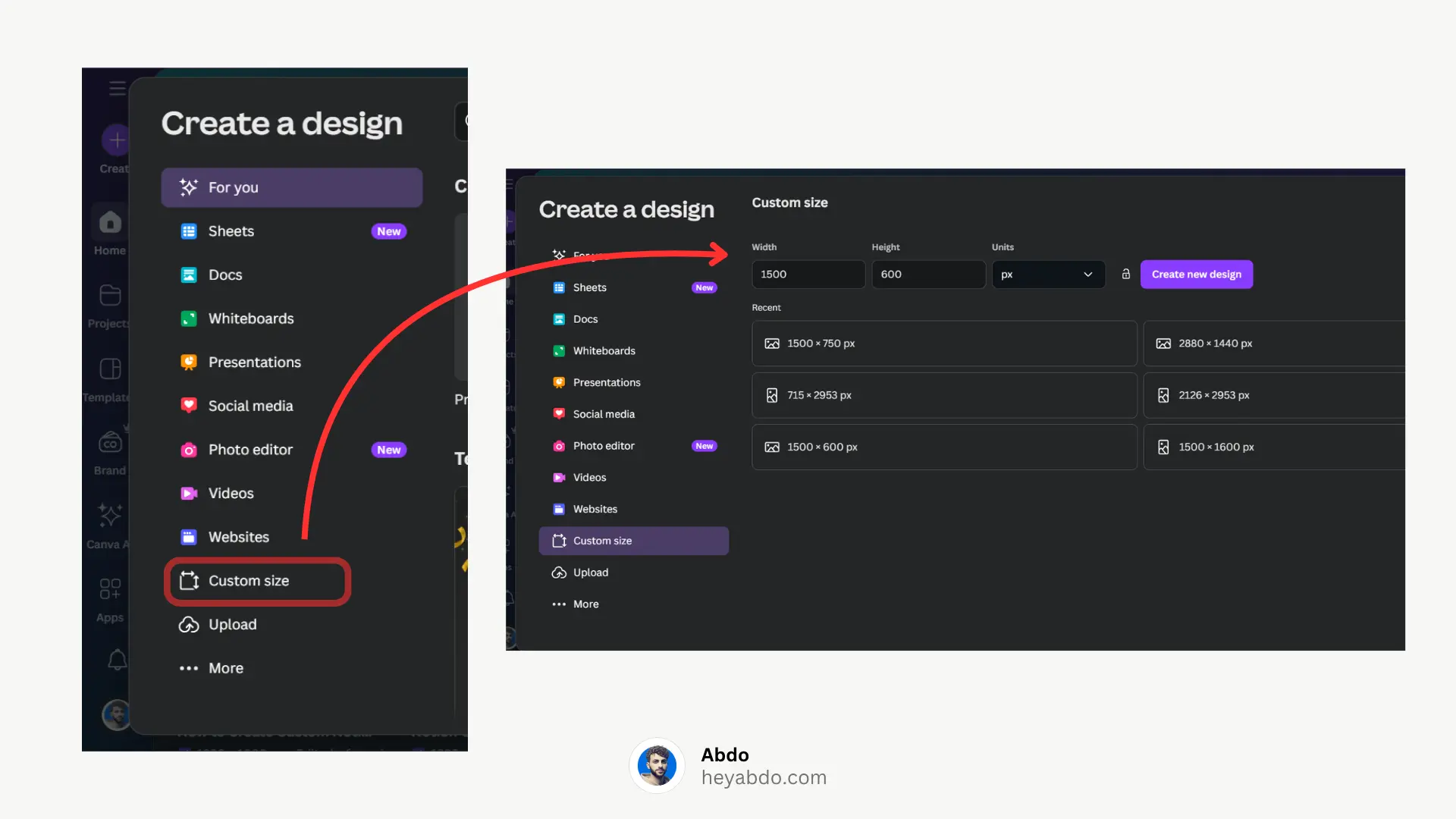
1: Set Up the Right Canvas
Go to canva.com
Click “Create a design”
Choose “Custom Size” and enter 1500 × 600 px
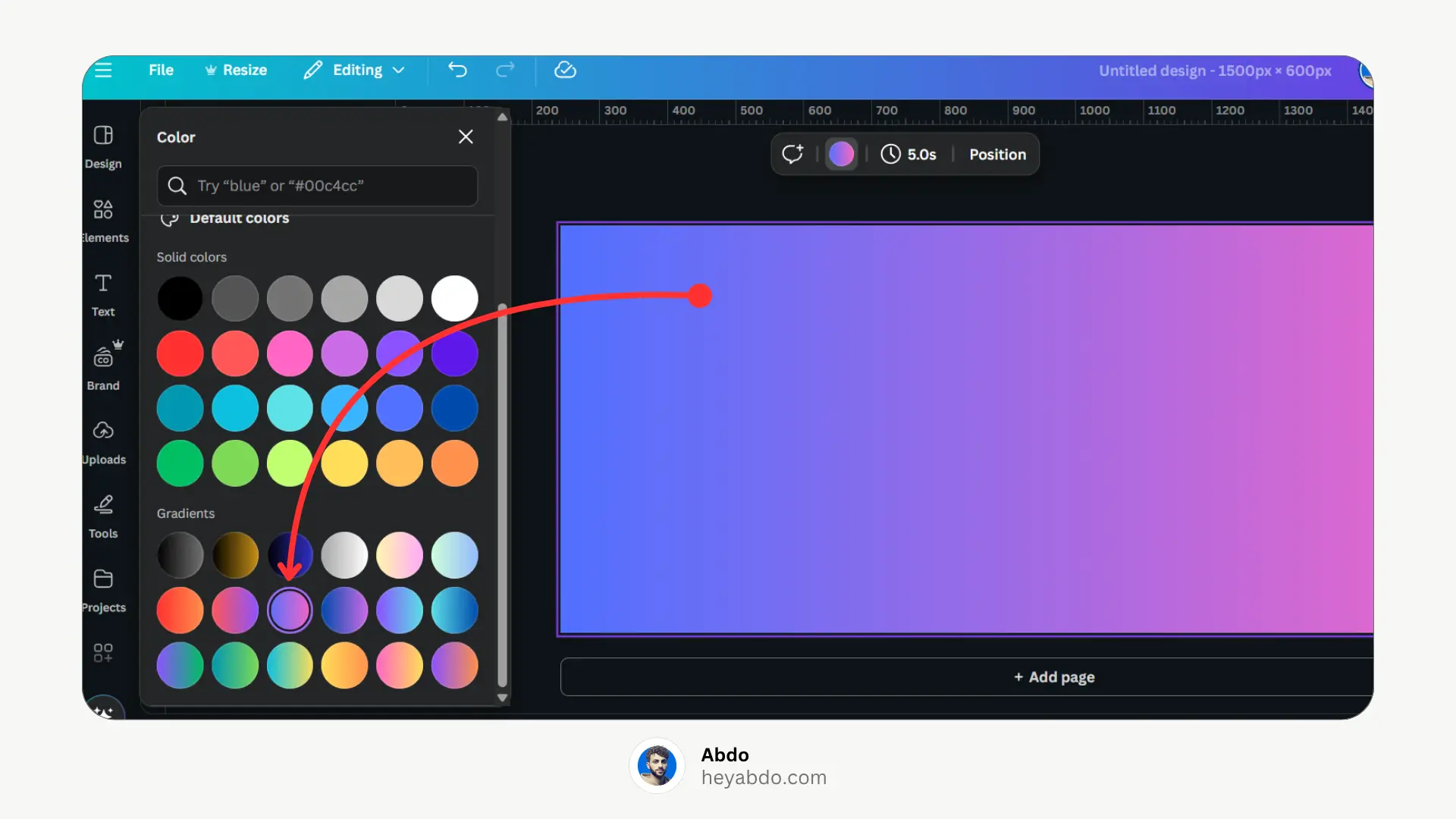
2: Choose a Background
Solid Color – Clean and minimal
Gradient – Adds depth
Photo – Use high-quality images from Unsplash (search inside Canva)
Abstract shapes or textures
3: Add Your Elements
Add text (your name, page title, quote)
Insert icons, emojis, or illustrations
Use frames or overlays for a layered look
Keep important content centered within 1000 × 400 px.
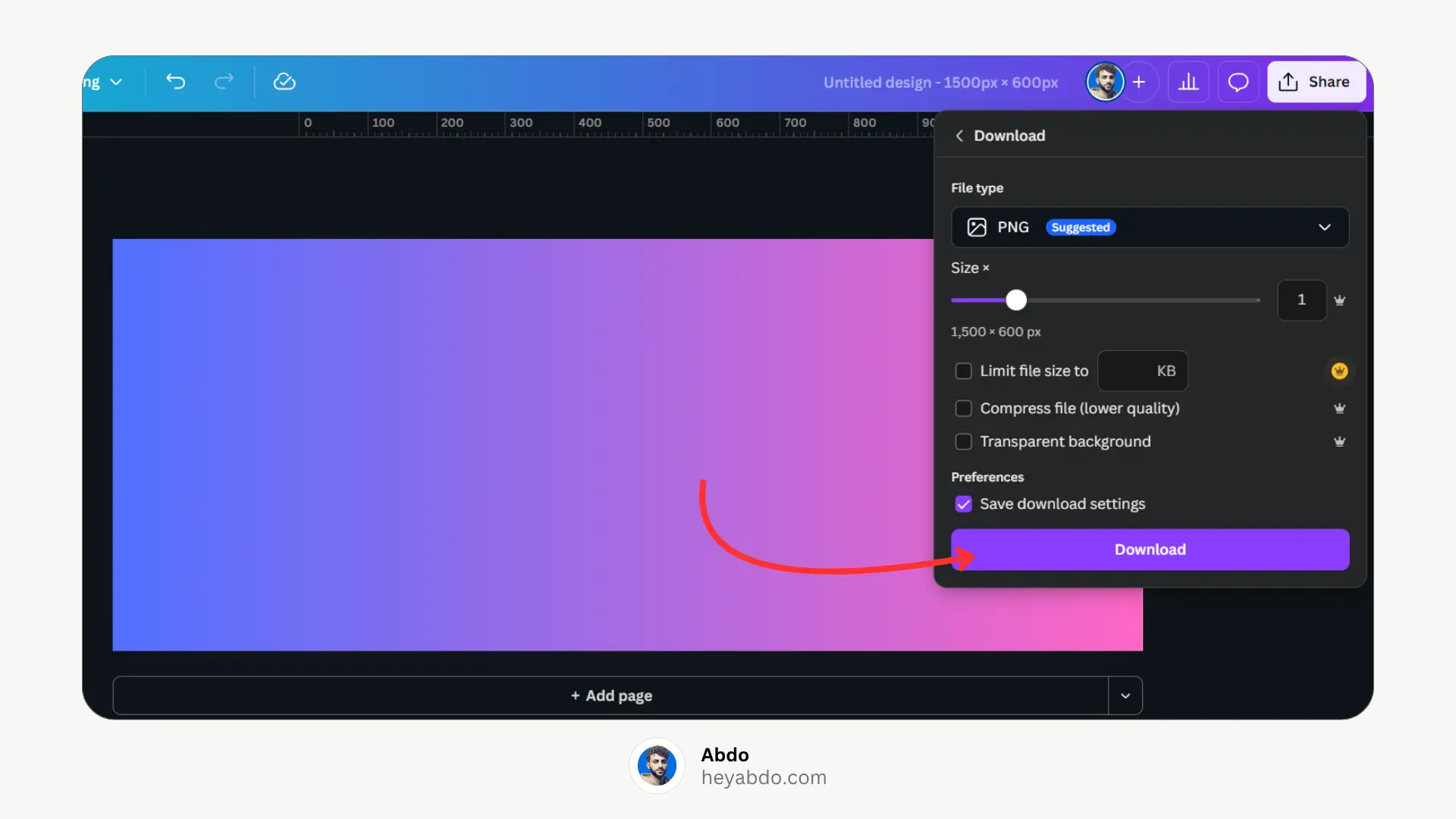
4: Download Your Cover
Click Share > Download
Format: JPG or PNG
Recommended: High Quality download setting
5: Upload to Notion
Open your Notion page
Click “Add Cover”
Click “Change Cover” → Upload
Select your Canva design
Drag to reposition, then Save position
Your custom cover is now live
Design Tips for Aesthetic Notion Covers
Use soft gradients or pastel tones
Add text overlays for titles or names
Stick to clean fonts like Inter, Lato, or Poppins
Avoid clutter—simplicity looks best in Notion
Match your cover color with your Notion icons for a cohesive look
Free Canva Template
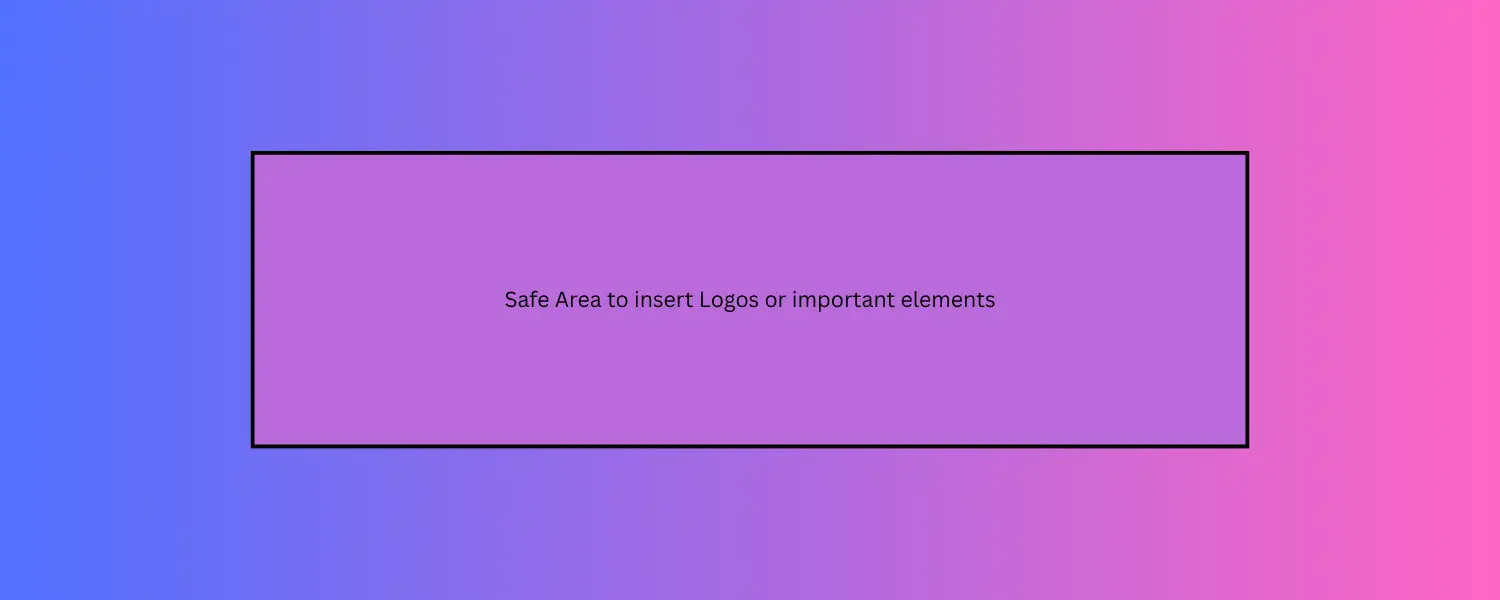
To make it even easier, I’ve created a free Notion cover template in Canva that you can duplicate and customize.
→ Click here to use the free Canva cover template
Need More
Struggling with dimensions? Our Notion Cover Size Guide breaks down all the sizes you need.
For ideas and ready-made covers, explore our Best 20 Aesthetic Notion Covers + Generator Sites.
If you want a complete overview, see the Ultimate Guide to Notion Covers for everything in one place.
First: What Size Should a Notion Cover Be?
To ensure your design looks crisp and doesn't get cropped, use this safe sizing formula:
Use Case | Dimensions | Notes |
|---|---|---|
Standard Cover | 1500 × 600 px | Best all-round size |
High-Res Devices | 3000 × 1200 px | For Retina/4K displays |
Mobile Safe Zone | Center 1000 × 400 px | Keep key elements here |
Gallery View | Square (1:1) or 4:3 | Set “Fit image” in database view |
How to Design a Custom Notion Cover using Canva?
Here’s how to make your custom cover using Canva—for free:
1: Set Up the Right Canvas
Go to canva.com
Click “Create a design”
Choose “Custom Size” and enter 1500 × 600 px
2: Choose a Background
Solid Color – Clean and minimal
Gradient – Adds depth
Photo – Use high-quality images from Unsplash (search inside Canva)
Abstract shapes or textures
3: Add Your Elements
Add text (your name, page title, quote)
Insert icons, emojis, or illustrations
Use frames or overlays for a layered look
Keep important content centered within 1000 × 400 px.
4: Download Your Cover
Click Share > Download
Format: JPG or PNG
Recommended: High Quality download setting
5: Upload to Notion
Open your Notion page
Click “Add Cover”
Click “Change Cover” → Upload
Select your Canva design
Drag to reposition, then Save position
Your custom cover is now live
Design Tips for Aesthetic Notion Covers
Use soft gradients or pastel tones
Add text overlays for titles or names
Stick to clean fonts like Inter, Lato, or Poppins
Avoid clutter—simplicity looks best in Notion
Match your cover color with your Notion icons for a cohesive look
Free Canva Template
To make it even easier, I’ve created a free Notion cover template in Canva that you can duplicate and customize.
→ Click here to use the free Canva cover template
Need More
Struggling with dimensions? Our Notion Cover Size Guide breaks down all the sizes you need.
For ideas and ready-made covers, explore our Best 20 Aesthetic Notion Covers + Generator Sites.
If you want a complete overview, see the Ultimate Guide to Notion Covers for everything in one place.

About
Maximize your Notion
workflow
Maximize your Notion
workflow
help people get more out of Notion without the complexity. With over 50,000 downloads, my minimalist templates support Startups, students, creators, and entrepreneurs in organizing their life and work with ease.
FAQ
What’s the ideal size for a Notion cover?
Why is my Notion cover blurry?
Can I use my own photos?
Are there any Notion cover generators?
Can I remove the Notion cover entirely?
Need a custom Notion system?
I build complete operating systems tailored to your business. Book a free 15-min call.
Book a Free Call →
Love it? Share it!


Need Something Custom?
Need a Custom Workspace?
We design and build complete Notion systems tailored specifically to your business — your clients, your services, your workflows. No generic templates.
We design and build complete Notion systems tailored specifically to your business — your clients, your services, your workflows. No generic templates.
Free 15-min strategy call included

Helping you manage your life and business in one place with Notion.
© 2026 Abdo. All rights reserved.
Helping you manage your life and business in one place with Notion.
© 2026 Abdo. All rights reserved.
Helping you manage your life and business in one place with Notion.
© 2026 Abdo. All rights reserved.