⚡ Limited time: Get Agency OS for $99 instead of $175 and save $76
Notion
Rental Properties
CRM
Property management
How to Manage Rental Properties in Notion
How to Manage Rental Properties in Notion
A UK landlord replaced spreadsheets and email reminders with one Notion system 13 modules, zero missed compliance, free plan only.

If you manage rental properties in the UK, you already know the pattern. It starts with one property and a spreadsheet. Then two properties. Then three. The spreadsheet gets bigger, the tabs multiply, and somewhere along the way you are managing compliance deadlines from a calendar reminder, chasing rent payments from memory, and hoping nothing important slips through the cracks.
Because eventually something always does.
This is the story of how NRR Properties replaced that entire system with one Notion workspace. 13 connected modules. Zero missed compliance deadlines. Built entirely on Notion's free plan.
If you manage rental properties in the UK, you already know the pattern. It starts with one property and a spreadsheet. Then two properties. Then three. The spreadsheet gets bigger, the tabs multiply, and somewhere along the way you are managing compliance deadlines from a calendar reminder, chasing rent payments from memory, and hoping nothing important slips through the cracks.
Because eventually something always does.
This is the story of how NRR Properties replaced that entire system with one Notion workspace. 13 connected modules. Zero missed compliance deadlines. Built entirely on Notion's free plan.
The problem every growing landlord faces
Spreadsheets are the default for landlords. They are free, flexible, and easy to start. The problem is not that they do not work — it is that they stop working the moment your portfolio grows beyond two or three properties.
One spreadsheet for properties. Another for tenants. Another for rent tracking.
Compliance certificates tracked in a calendar that nobody else can see.
Invoices created manually in Word or Excel, with no automatic overdue alerts.
Documents — gas safety certificates, EPCs, electrical reports — scattered across email folders.
No single place to see the full portfolio at a glance.
The problem every growing landlord faces
Spreadsheets are the default for landlords. They are free, flexible, and easy to start. The problem is not that they do not work — it is that they stop working the moment your portfolio grows beyond two or three properties.
One spreadsheet for properties. Another for tenants. Another for rent tracking.
Compliance certificates tracked in a calendar that nobody else can see.
Invoices created manually in Word or Excel, with no automatic overdue alerts.
Documents — gas safety certificates, EPCs, electrical reports — scattered across email folders.
No single place to see the full portfolio at a glance.
⚠ The real risk for UK landlords
Missing a gas safety certificate renewal can result in a fine of up to £30,000. An expired EPC means you cannot legally rent the property. These are not administrative inconveniences — they are compliance failures with serious financial consequences. Most landlords manage this with a calendar reminder and hope. That is not a system.
⚠ The real risk for UK landlords
Missing a gas safety certificate renewal can result in a fine of up to £30,000. An expired EPC means you cannot legally rent the property. These are not administrative inconveniences — they are compliance failures with serious financial consequences. Most landlords manage this with a calendar reminder and hope. That is not a system.
What NRR Properties was dealing with
NRR Properties is a UK-based residential and commercial property portfolio. As the portfolio grew — from a handful of units to multiple residential and commercial properties — the spreadsheet-based system started breaking down. Properties, tenants, leases, invoices, and compliance documents were all managed separately, with no connection between them.
There was no way to see the full portfolio in one place. No automatic alerts for compliance deadlines. No invoice tracking that flagged overdue payments without someone manually checking. Every piece of information lived in a different place, maintained by a different person, with no single source of truth.
What NRR Properties was dealing with
NRR Properties is a UK-based residential and commercial property portfolio. As the portfolio grew — from a handful of units to multiple residential and commercial properties — the spreadsheet-based system started breaking down. Properties, tenants, leases, invoices, and compliance documents were all managed separately, with no connection between them.
There was no way to see the full portfolio in one place. No automatic alerts for compliance deadlines. No invoice tracking that flagged overdue payments without someone manually checking. Every piece of information lived in a different place, maintained by a different person, with no single source of truth.
💡 The root cause
The problem was not effort or organization. It was architecture. When every piece of information lives in a separate place with no connections between them, the system fails at scale — regardless of how diligent the person managing it is.
💡 The root cause
The problem was not effort or organization. It was architecture. When every piece of information lives in a separate place with no connections between them, the system fails at scale — regardless of how diligent the person managing it is.
What we built — 13 modules in one workspace
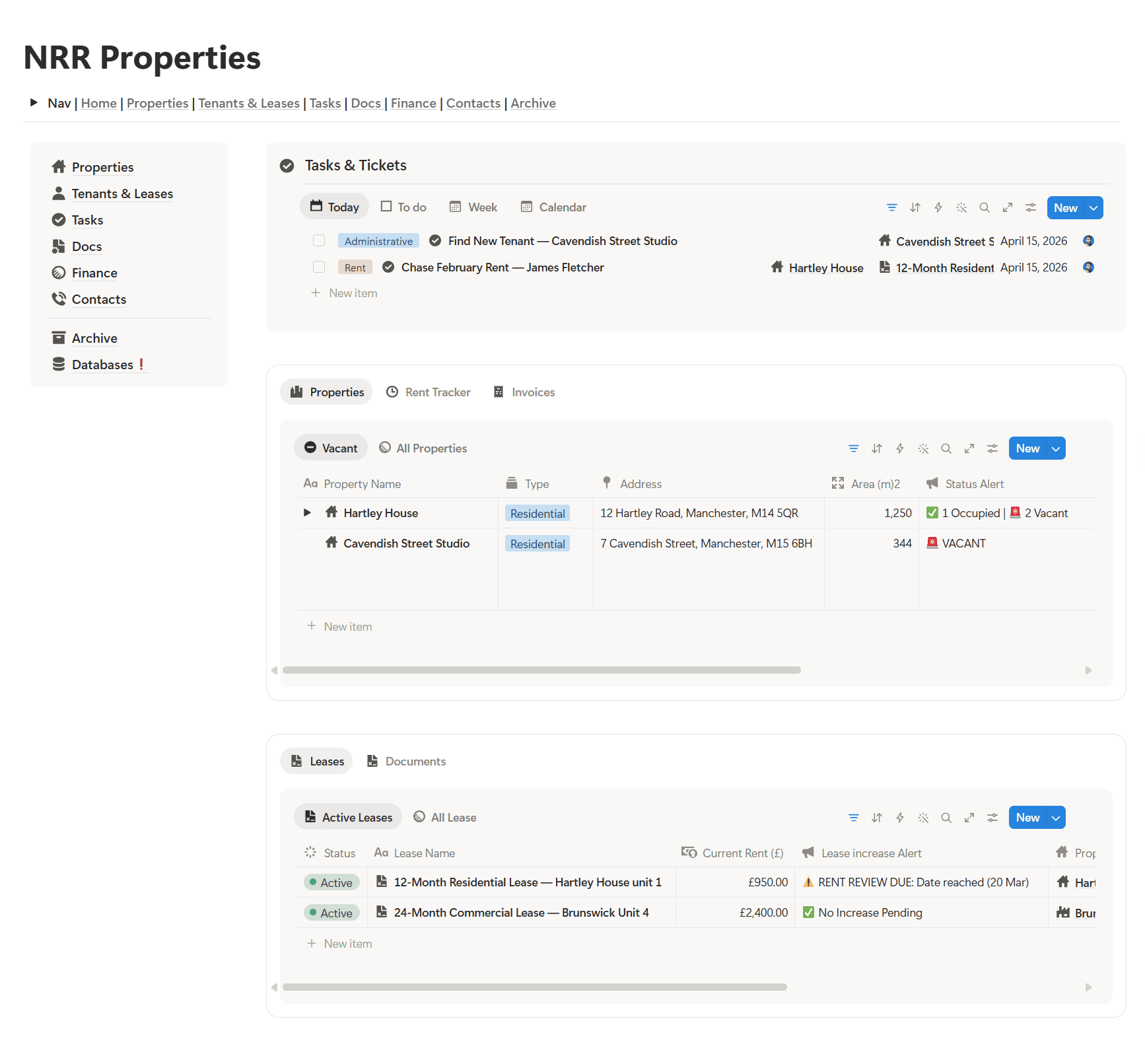
We built a complete property operating system in Notion — 13 connected modules covering every aspect of the portfolio. Here is exactly what is inside:
13 modules connected
0 missed compliance since launch
Free Notion plan — entire OS
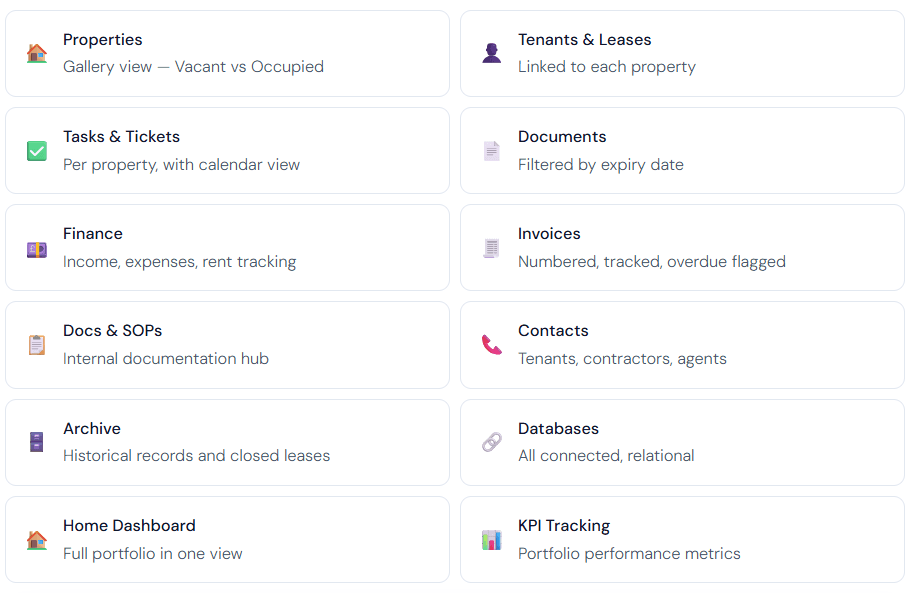
How each module works together
Properties database — the foundation
Every property is a full record in the Properties database. Each record holds the property address, type (Residential or Commercial), current vacancy status, photos, and links to all tenants, leases, tasks, invoices, and documents for that property. The gallery view shows Vacant and Occupied properties at a glance — no digging required.
Tenants & Leases — linked to everything
Each tenant is a record linked to their property and their lease. The lease record shows the current rent, last paid date, rent due day, and lease end date. Active leases are filtered into one view. When a lease ends, it moves to the archive automatically. There is no separate spreadsheet — everything connects.
Compliance documents — filtered by expiry
Every compliance certificate — gas safety, EPC, electrical installation condition report — lives in the Documents database linked to its property. The default view filters to Expiring Soon so the most urgent items are always visible without any manual sorting. A second view shows all documents grouped by property.
What we built — 13 modules in one workspace
We built a complete property operating system in Notion — 13 connected modules covering every aspect of the portfolio. Here is exactly what is inside:
13 modules connected
0 missed compliance since launch
Free Notion plan — entire OS
How each module works together
Properties database — the foundation
Every property is a full record in the Properties database. Each record holds the property address, type (Residential or Commercial), current vacancy status, photos, and links to all tenants, leases, tasks, invoices, and documents for that property. The gallery view shows Vacant and Occupied properties at a glance — no digging required.
Tenants & Leases — linked to everything
Each tenant is a record linked to their property and their lease. The lease record shows the current rent, last paid date, rent due day, and lease end date. Active leases are filtered into one view. When a lease ends, it moves to the archive automatically. There is no separate spreadsheet — everything connects.
Compliance documents — filtered by expiry
Every compliance certificate — gas safety, EPC, electrical installation condition report — lives in the Documents database linked to its property. The default view filters to Expiring Soon so the most urgent items are always visible without any manual sorting. A second view shows all documents grouped by property.
💡 Why this matters for UK landlords
The Expiring Soon view means you never open the system to find a compliance document has already expired. You see it weeks in advance. That is the difference between a fine and a renewal.
💡 Why this matters for UK landlords
The Expiring Soon view means you never open the system to find a compliance document has already expired. You see it weeks in advance. That is the difference between a fine and a renewal.

About
Maximize your Notion
workflow
Maximize your Notion
workflow
help people get more out of Notion without the complexity. With over 50,000 downloads, my minimalist templates support Startups, students, creators, and entrepreneurs in organizing their life and work with ease.
FAQ
Can you use Notion to manage rental properties?
How do you track compliance deadlines in Notion?
What is the best free tool for UK landlords?
Do I need a paid Notion plan for this?
How long does it take to set up a property management system in Notion?
Need a custom Notion system?
I build complete operating systems tailored to your business. Book a free 15-min call.
Book a Free Call →
Love it? Share it!


Need Something Custom?
Need a Custom Workspace?
We design and build complete Notion systems tailored specifically to your business — your clients, your services, your workflows. No generic templates.
We design and build complete Notion systems tailored specifically to your business — your clients, your services, your workflows. No generic templates.
Free 15-min strategy call included

Helping you manage your life and business in one place with Notion.
© 2026 Abdo. All rights reserved.
Helping you manage your life and business in one place with Notion.
© 2026 Abdo. All rights reserved.
Helping you manage your life and business in one place with Notion.
© 2026 Abdo. All rights reserved.