⚡ Limited time: Get Agency OS for $99 instead of $175 and save $76
Notion
Property ERP
Owner Portal
Vacation Rental
How to Manage Multiple Airbnb Properties in Notion
How to Manage Multiple Airbnb Properties in Notion
A full walkthrough of the Notion workspace built to manage Airbnb portfolios — booking pipeline, daily check-in dashboard, housekeeping tasks, and automated revenue tracking. No extra software required.

If you manage more than one Airbnb property, you already know what the chaos looks like. One property needs restocking. Another has a check-in in three hours and housekeeping has not confirmed. A guest just messaged about the WiFi password, and you cannot remember which handbook you put it in — or if you even made one for that unit.
None of this is a people problem. It is a systems problem. And most Airbnb hosts are running their entire portfolio on a combination of spreadsheets, DMs, and mental overhead that was not designed to scale past one property.
If you manage more than one Airbnb property, you already know what the chaos looks like. One property needs restocking. Another has a check-in in three hours and housekeeping has not confirmed. A guest just messaged about the WiFi password, and you cannot remember which handbook you put it in — or if you even made one for that unit.
None of this is a people problem. It is a systems problem. And most Airbnb hosts are running their entire portfolio on a combination of spreadsheets, DMs, and mental overhead that was not designed to scale past one property.
The real problem with managing multiple Airbnb properties
Scaling from one Airbnb to two, three, or five properties does not just double your workload, it multiplies the complexity in ways that flat tools cannot handle. The problem is not volume. It is visibility and coordination.
Booking details live across Airbnb, email, and a shared notes app nobody fully trusts
Housekeeping tasks get communicated through WhatsApp and sometimes missed entirely
Inventory is tracked in memory until something runs out at the worst moment
There is no single place to see what is checked in today, what is checking out, and what still needs attention
Financial reporting means opening three different things and doing manual calculations each month
The real problem with managing multiple Airbnb properties
Scaling from one Airbnb to two, three, or five properties does not just double your workload, it multiplies the complexity in ways that flat tools cannot handle. The problem is not volume. It is visibility and coordination.
Booking details live across Airbnb, email, and a shared notes app nobody fully trusts
Housekeeping tasks get communicated through WhatsApp and sometimes missed entirely
Inventory is tracked in memory until something runs out at the worst moment
There is no single place to see what is checked in today, what is checking out, and what still needs attention
Financial reporting means opening three different things and doing manual calculations each month
⚠ The scaling trap
The systems that work for one property break at three. By five, they collapse completely. Hosts who try to manage growing portfolios with the same informal setup end up spending more time managing the chaos than actually hosting. Guest experience suffers before the system does.
⚠ The scaling trap
The systems that work for one property break at three. By five, they collapse completely. Hosts who try to manage growing portfolios with the same informal setup end up spending more time managing the chaos than actually hosting. Guest experience suffers before the system does.
What an Airbnb management system in Notion actually needs
You do not need more apps. You need one connected workspace where properties, bookings, operations, and finances all live together and talk to each other. Here is what that looks like in practice.
1. A Properties hub — your portfolio at a glance
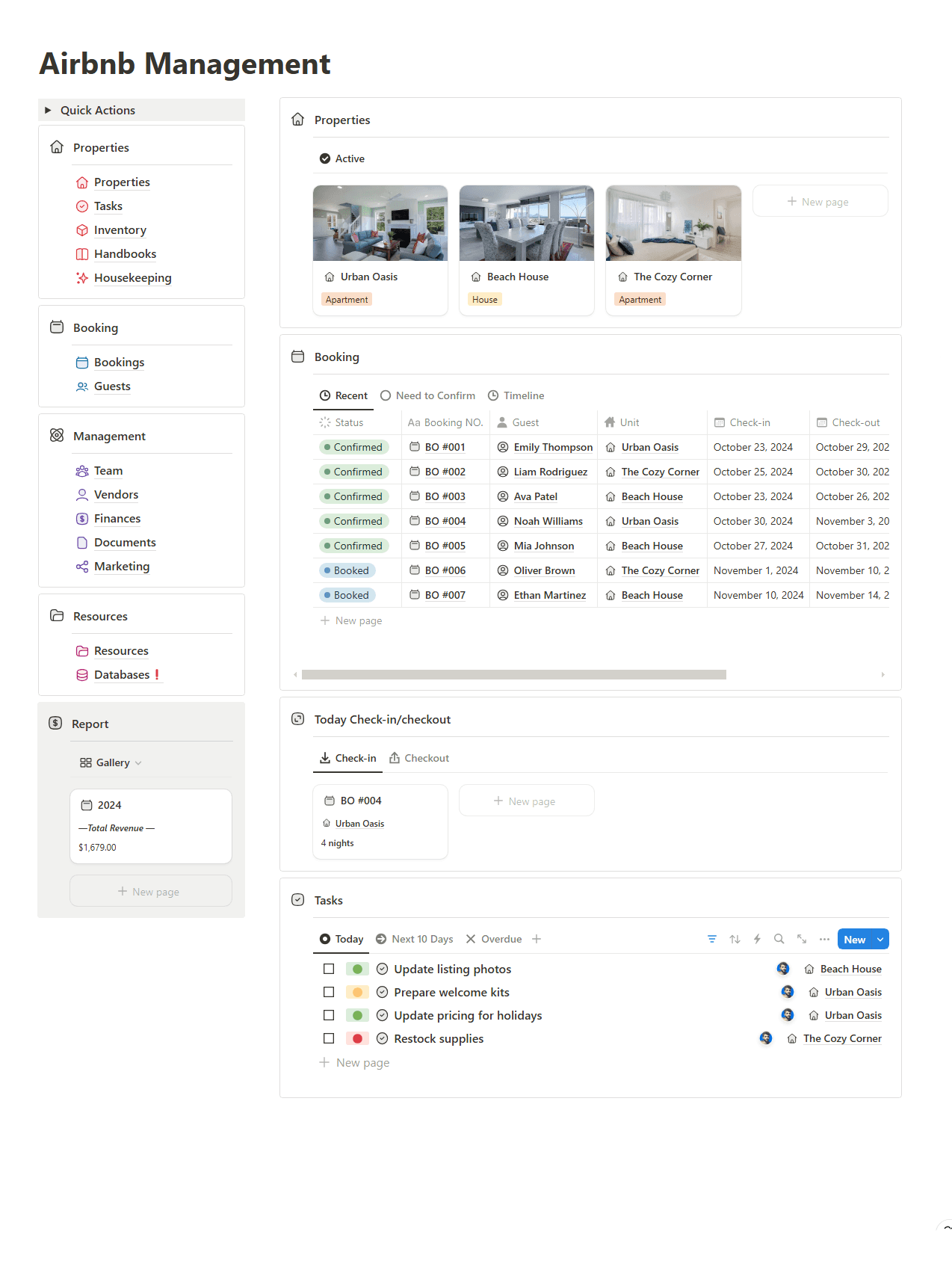
Every property gets its own page inside a central database. Not a row in a spreadsheet, a full record with property type, photos, status, linked tasks, inventory, housekeeping checklists, and a guest handbook baked in. When you open Urban Oasis, everything about that unit is right there.
The properties database becomes the anchor for everything else. Bookings link to it. Tasks link to it. Revenue reports pull from it. The property is the source of truth, and everything else is a view of that truth.
2. A Booking pipeline full guest lifecycle in one view
Every reservation lives as a database record with booking number, guest name, property, check-in and check-out dates, number of nights, and status Confirmed, Booked, Checked In, or Complete. You can view it as a list filtered by recent bookings, as a calendar timeline, or as a smart "Need to Confirm" queue so nothing slips.
3. A Daily Operations dashboard today's check-ins and tasks
This is the page that replaces your morning scramble. A filtered view shows only the bookings checking in today and the bookings checking out today. A linked task board — filtered to Today and Next 10 Days — shows every open task across every property. You open one page and you know exactly what the day requires.
Tasks are linked to properties, so housekeeping at the Beach House and a restock at Urban Oasis are not two separate lists. They are one unified operations view.
4. A Finances engine revenue without the spreadsheet
A financial database tracks revenue per booking, per property, and per month. Rollup fields calculate your gross automatically. There is no end-of-month scramble to pull together numbers from different platforms. The revenue report is always live because it is built on the same bookings database you are already updating every day.
What an Airbnb management system in Notion actually needs
You do not need more apps. You need one connected workspace where properties, bookings, operations, and finances all live together and talk to each other. Here is what that looks like in practice.
1. A Properties hub — your portfolio at a glance
Every property gets its own page inside a central database. Not a row in a spreadsheet, a full record with property type, photos, status, linked tasks, inventory, housekeeping checklists, and a guest handbook baked in. When you open Urban Oasis, everything about that unit is right there.
The properties database becomes the anchor for everything else. Bookings link to it. Tasks link to it. Revenue reports pull from it. The property is the source of truth, and everything else is a view of that truth.
2. A Booking pipeline full guest lifecycle in one view
Every reservation lives as a database record with booking number, guest name, property, check-in and check-out dates, number of nights, and status Confirmed, Booked, Checked In, or Complete. You can view it as a list filtered by recent bookings, as a calendar timeline, or as a smart "Need to Confirm" queue so nothing slips.
3. A Daily Operations dashboard today's check-ins and tasks
This is the page that replaces your morning scramble. A filtered view shows only the bookings checking in today and the bookings checking out today. A linked task board — filtered to Today and Next 10 Days — shows every open task across every property. You open one page and you know exactly what the day requires.
Tasks are linked to properties, so housekeeping at the Beach House and a restock at Urban Oasis are not two separate lists. They are one unified operations view.
4. A Finances engine revenue without the spreadsheet
A financial database tracks revenue per booking, per property, and per month. Rollup fields calculate your gross automatically. There is no end-of-month scramble to pull together numbers from different platforms. The revenue report is always live because it is built on the same bookings database you are already updating every day.
💡 The key insight
Every section of this workspace shares data rather than duplicating it. When you add a new booking, the revenue updates. When you mark a task done, the property dashboard reflects it. This is the difference between a connected system and a collection of separate lists.
💡 The key insight
Every section of this workspace shares data rather than duplicating it. When you add a new booking, the revenue updates. When you mark a task done, the property dashboard reflects it. This is the difference between a connected system and a collection of separate lists.
Step-by-step: how to build this Notion Airbnb system yourself
Here is exactly how to build this workspace. You need a free Notion account and about one focused weekend. If you would rather have it built for you, book a free discovery call here.
Create your Properties database
Start a new Notion database called "Properties." Add these fields: Property Name, Type (Apartment / House / Villa), Status (Active / Inactive), Location, Bedrooms, Max Guests, Listing URL, Notes. Create a page for each property — this is the foundation everything else will connect to. Add real property photos as cover images so the gallery view becomes a proper visual portfolio.
Build your Bookings database
Create a second database called "Bookings." Add: Booking Number, Guest (relation → Guests database), Property (relation → Properties), Status (Booked / Confirmed / Checked In / Complete / Cancelled), Check-in Date, Check-out Date, Nights (formula), Revenue, Notes. The relation to Properties is critical — it is what makes your revenue rollups and property-filtered views work automatically.
Set up your Guests database
Create a "Guests" database with: Guest Name, Email, Phone, Nationality, Past Bookings (relation → Bookings), Total Stays (rollup), Notes, VIP flag. Having a guest record separate from a booking means returning guests build up a history. You can filter for VIP guests, track total revenue per guest, and personalise the experience over time.
Create the Tasks and Housekeeping system
Build a "Tasks" database with: Task Name, Property (relation → Properties), Assigned To, Priority (High / Medium / Low), Due Date, Status (Open / In Progress / Done), Category (Housekeeping / Maintenance / Inventory / Admin). Add a filtered view called "Today" showing all tasks due today across all properties. This replaces every WhatsApp message to your cleaning team.
Build the main Dashboard page
Create a new page called "Airbnb Management" — this is your daily command centre. Add linked views: Active Properties gallery, Bookings table filtered to Recent, a Check-in view (bookings with today's check-in date), a Checkout view, and the Tasks board filtered to Today and Next 10 Days. Add a Finance section showing a gallery of monthly revenue records. Every view pulls live data — you never update this page manually.
Add Handbooks and Inventory per property
Inside each property page, create two subpages: a Guest Handbook (WiFi password, house rules, local recommendations, check-out instructions) and an Inventory list (consumables, linens, kitchen stock). Link Inventory items to Tasks so when something runs low, a restock task is one click away. This is what converts a basic tracker into a full property operating system.
When to hire a Notion consultant instead of building it yourself
You can absolutely build this system yourself. But there are situations where bringing in a Notion consultant is the faster, smarter move:
You manage 3 or more properties and need the system live now not after four weekends of trial and error
You have tried Notion before and ended up with a workspace nobody uses because the structure was wrong from the start
You need automations — check-in reminders, housekeeping triggers, guest messaging, or integrations with Airbnb and booking platforms
You want private owner dashboards where each property owner sees only their own revenue and booking data
You are scaling fast and need a system that is architected to handle 10, 15, or 20 properties without being rebuilt
A custom build typically takes one week from discovery call to handoff. Book a free 15-minute call — I will tell you honestly whether a custom build is right for where you are now.
Step-by-step: how to build this Notion Airbnb system yourself
Here is exactly how to build this workspace. You need a free Notion account and about one focused weekend. If you would rather have it built for you, book a free discovery call here.
Create your Properties database
Start a new Notion database called "Properties." Add these fields: Property Name, Type (Apartment / House / Villa), Status (Active / Inactive), Location, Bedrooms, Max Guests, Listing URL, Notes. Create a page for each property — this is the foundation everything else will connect to. Add real property photos as cover images so the gallery view becomes a proper visual portfolio.
Build your Bookings database
Create a second database called "Bookings." Add: Booking Number, Guest (relation → Guests database), Property (relation → Properties), Status (Booked / Confirmed / Checked In / Complete / Cancelled), Check-in Date, Check-out Date, Nights (formula), Revenue, Notes. The relation to Properties is critical — it is what makes your revenue rollups and property-filtered views work automatically.
Set up your Guests database
Create a "Guests" database with: Guest Name, Email, Phone, Nationality, Past Bookings (relation → Bookings), Total Stays (rollup), Notes, VIP flag. Having a guest record separate from a booking means returning guests build up a history. You can filter for VIP guests, track total revenue per guest, and personalise the experience over time.
Create the Tasks and Housekeeping system
Build a "Tasks" database with: Task Name, Property (relation → Properties), Assigned To, Priority (High / Medium / Low), Due Date, Status (Open / In Progress / Done), Category (Housekeeping / Maintenance / Inventory / Admin). Add a filtered view called "Today" showing all tasks due today across all properties. This replaces every WhatsApp message to your cleaning team.
Build the main Dashboard page
Create a new page called "Airbnb Management" — this is your daily command centre. Add linked views: Active Properties gallery, Bookings table filtered to Recent, a Check-in view (bookings with today's check-in date), a Checkout view, and the Tasks board filtered to Today and Next 10 Days. Add a Finance section showing a gallery of monthly revenue records. Every view pulls live data — you never update this page manually.
Add Handbooks and Inventory per property
Inside each property page, create two subpages: a Guest Handbook (WiFi password, house rules, local recommendations, check-out instructions) and an Inventory list (consumables, linens, kitchen stock). Link Inventory items to Tasks so when something runs low, a restock task is one click away. This is what converts a basic tracker into a full property operating system.
When to hire a Notion consultant instead of building it yourself
You can absolutely build this system yourself. But there are situations where bringing in a Notion consultant is the faster, smarter move:
You manage 3 or more properties and need the system live now not after four weekends of trial and error
You have tried Notion before and ended up with a workspace nobody uses because the structure was wrong from the start
You need automations — check-in reminders, housekeeping triggers, guest messaging, or integrations with Airbnb and booking platforms
You want private owner dashboards where each property owner sees only their own revenue and booking data
You are scaling fast and need a system that is architected to handle 10, 15, or 20 properties without being rebuilt
A custom build typically takes one week from discovery call to handoff. Book a free 15-minute call — I will tell you honestly whether a custom build is right for where you are now.

About
Maximize your Notion
workflow
Maximize your Notion
workflow
help people get more out of Notion without the complexity. With over 50,000 downloads, my minimalist templates support Startups, students, creators, and entrepreneurs in organizing their life and work with ease.
FAQ
Can Notion be used to manage Airbnb properties?
What is the best Notion template for Airbnb hosts?
How do I track Airbnb bookings in Notion?
Can Notion replace Airbnb property management software like Hostaway or Guesty?
How do I manage Airbnb housekeeping with Notion?
Need a custom Notion system?
I build complete operating systems tailored to your business. Book a free 15-min call.
Book a Free Call →
Love it? Share it!


Need Something Custom?
Need a Custom Workspace?
We design and build complete Notion systems tailored specifically to your business — your clients, your services, your workflows. No generic templates.
We design and build complete Notion systems tailored specifically to your business — your clients, your services, your workflows. No generic templates.
Free 15-min strategy call included

Helping you manage your life and business in one place with Notion.
© 2026 Abdo. All rights reserved.
Helping you manage your life and business in one place with Notion.
© 2026 Abdo. All rights reserved.
Helping you manage your life and business in one place with Notion.
© 2026 Abdo. All rights reserved.